Hotel Room Booking Using JDBC Java
 HARISH SS
Jul 03, 2023
HARISH SS
Jul 03, 2023
Java-based reservation system for booking and removing rooms, tracking total bookings. Utilizes MySQL database, includes input validation, exception handling.
DESCRIPTION
-
Mainclass:- Acts as the entry point of the program.
- Prompts the user for a choice (1 to check the number of booked rooms, 2 to book a room, or 3 to remove a booked room).
- Based on the user's choice, it invokes the corresponding methods from other classes.
-
Bookedclass:- Contains a method named
totalBookedthat retrieves the count of distinct booked rooms from the database and prints the result.
- Contains a method named
-
NewBooksclass:- Allows users to book a new room by providing their username, age, and mobile number.
- Inserts the user details into the database using a prepared statement.
-
RemoveBooksclass:- Provides a method named
removeBookedRoomsthat removes a booked room from the database based on the room number provided.
- Provides a method named
-
DataBaseConclass:- Establishes a connection to the MySQL database using the JDBC driver.
project result:
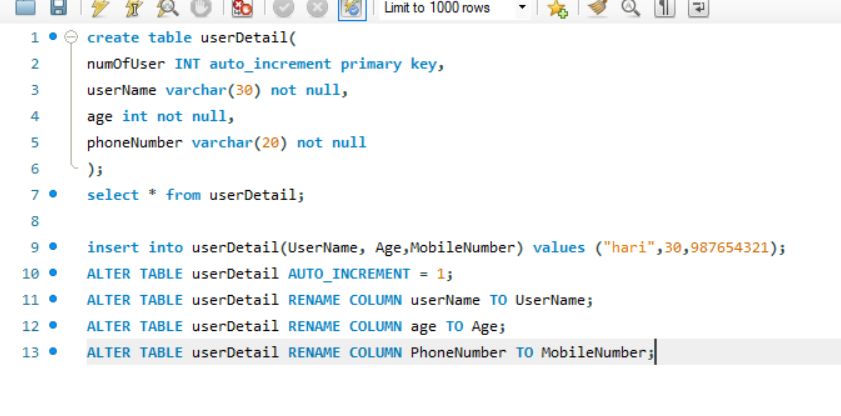
DATABASE SQL QUERY:
# RESULT:
Enter 1 to check number of booked room :
Enter 2 to book the room:
Enter 3 to remove the booked room:
Enter your choice form (1 to 3):
1
Total number of booked rooms: 6
Enter 1 to check number of booked room :
Enter 2 to book the room:
Enter 3 to remove the booked room:
Enter your choice form (1 to 3):
2
Enter your username:
KISHORE
Enter your age:
33
Enter your mobile number:
3423424534
Rows affected: 1
User details have been updated.
Enter 1 to check number of booked room :
Enter 2 to book the room:
Enter 3 to remove the booked room:
Enter your choice form (1 to 3):
3
Enter Your Room Number:
9
Rows affected: 0
The room has been successfully unbooked.
Enter 1 to check number of booked room :
Enter 2 to book the room:
Enter 3 to remove the booked room:
Enter your choice form (1 to 3):
3
Enter Your Room Number:
10
Rows affected: 1
The room has been successfully unbooked.
Enter 1 to check number of booked room :
Enter 2 to book the room:
Enter 3 to remove the booked room:
Enter your choice form (1 to 3):
-----------------------------------------------------END------------------------------------------------------------------
Project Files
| .. | ||
| This directory is empty. | ||
